

Plugins · Display

Screen Sync + viewneo

Drive multiple screens from viewneo in perfect sync — build a video wall, mirror content across displays or run independent playlists timed to a master device.

What the Screen Sync plugin does

The viewneo Screen Sync plugin is a multi-screen coordination add-on that enables multiple viewneo players to operate as a single group. In video wall mode, a single piece of content — an image, video, or live data widget — is divided across all screens in the array, so the display reads as one large canvas. In synchronised mode, every screen shows the same playlist with frames locked to a master player, producing a consistent look across a corridor of displays or an entire floor. viewneo manages the group configuration through the standard CMS interface.

The plugin removes the need for dedicated video wall controllers or tightly coupled hardware. You use the same standard players you would for single-screen installations, which simplifies procurement and reduces the cost of larger deployments. For installations where touch lockdown is also needed alongside a synchronised display, pairing this plugin with the Kiosk Mode plugin covers both requirements.

How it works

  1. Assign players to a sync group — in viewneo, add the devices you want to synchronise to a Screen Sync group and designate one as the master.
  2. Choose your display mode — select video wall (content split across screens), synchronised (same playlist on all screens) or multi-content (separate playlists, synchronised timing).
  3. Publish your content — upload and assign content as usual. The master player distributes timing signals to all group members, and playback stays in step automatically.

Example use cases

  • Retail feature walls — a row of four screens behind a service counter plays a product video as a single wide canvas, creating a visual focal point without a dedicated video wall unit.
  • Airport or transit hubs — multiple screens along a corridor show the same departure information simultaneously so passengers see consistent data regardless of which screen they pass.
  • Corporate event spaces — a conference room uses three screens to display a wide presentation backdrop, with each screen showing its segment without visible delay.

Compatible with

  • viewneo Professional and viewneo Enterprise — bookable per player, transferable to other players
  • Multiple viewneo players on the same local network
  • Standard consumer or commercial displays (no special video wall monitors required)
  • Video wall mode

    Stretch a single piece of content across multiple screens in a grid, with each player showing its own segment cleanly and in sync.

  • Synchronised content

    All devices share the same playlist and a master device controls timing, so every screen shows the same frame at the same moment.

  • Multi-content mode

    Each player runs its own playlist independently while remaining time-synchronised with the group for coordinated scheduling.

  • No specialist hardware required

    Standard viewneo players replace dedicated video wall processors, reducing hardware costs for multi-screen installations.

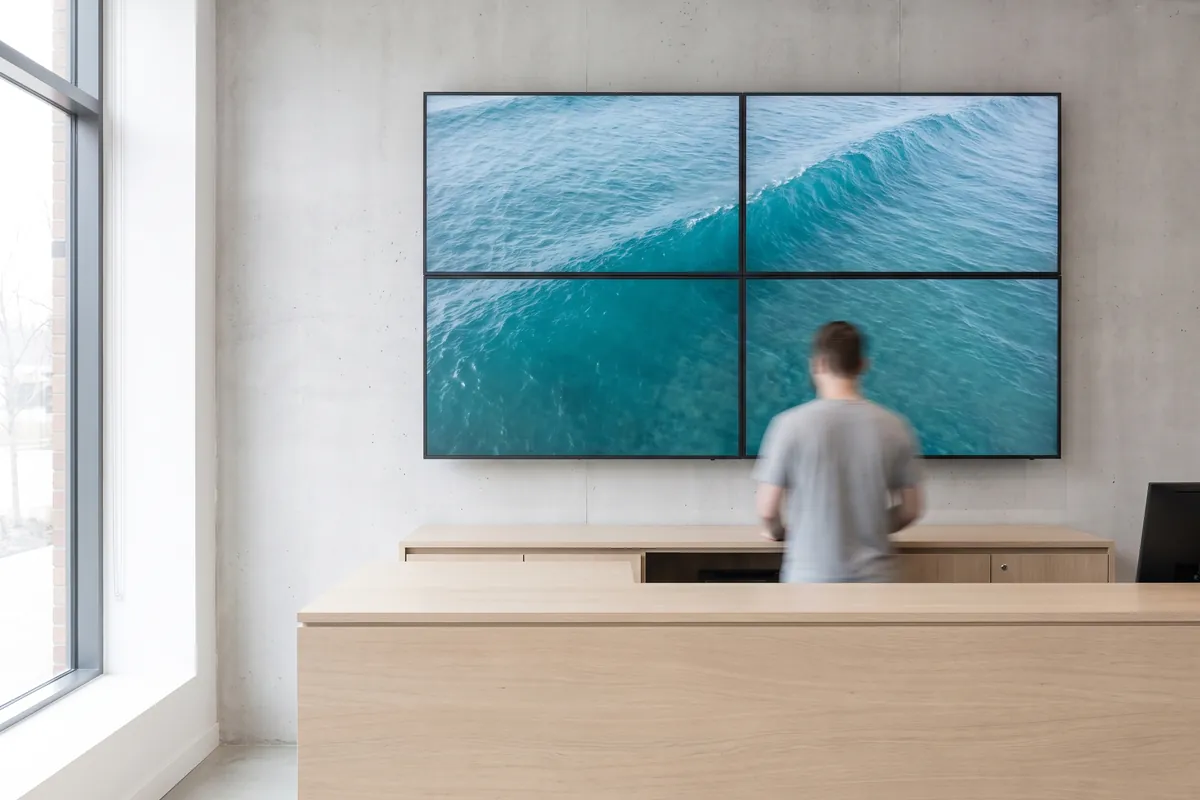
Four displays behind a service counter form a 2 × 2 video wall showing one continuous image of an ocean wave.

On screen

A video wall built from standard viewneo players

Four standard players display a single product video as one wide canvas behind a service counter — no dedicated video wall unit, no specialist cabling.

  • One content item spans multiple screens in a clean, synchronised grid
  • Master player keeps all group members in frame-accurate sync
  • Standard players replace dedicated video wall processors

Frequently asked questions

What does the Screen Sync plugin cost?
$1.50 per player and month or $15.00 per player and year — depending on whether your subscription is billed monthly or yearly. The plugin can be booked from viewneo Professional, is enabled free of charge during the 30-day trial and can be re-assigned to another player at any time. All prices are on the pricing page.
How many screens can be synchronised with the Screen Sync plugin?
Check the viewneo documentation or contact the sales team for the current maximum number of synchronised players per group.
How does synchronisation work between players?
One device acts as the master and sets the content timing reference. All other players in the group align their playback to the master over the local network, keeping frames in step across all screens.
Preview of the new contboxx home page with a stele showing the weather

contboxx launches on 1 November

The new content platform contboxx goes live at contboxx.com on 1 November 2026 — with pricing, channels and sign-up. Here is a first look at the home page.